EdgeRed

Home Company We Built Our Own Office Tracker. Here’s How.

We Built Our Own Office Tracker. Here's How.

If you hot desk for work, have you ever found yourself thinking any of these things on your commute?:

“Is someone sitting in my favourite seat?”

“Running late — will there even be a spot left?”

“Is anyone actually in today, or will it just be me?

And if you manage the office:

“We’re paying for all this space. How much of it is actually being used?”

“How long before we outgrow it?”

At EdgeRed, we wanted real answers to these questions — without paying for another subscription, downloading another app, or asking anyone to change how they work. So we built our own IoT-driven system. We call it Spot.
Here’s how we did it.

Owning the infrastructure

Before writing a single line of code, we made a deliberate architectural choice: self-host wherever possible.
We’d looked at off-the-shelf solutions. Most of them meant vendor lock-in, ongoing subscription costs, and handing data to a third party. None of that appealed to us. Instead, we set up an open-source Linux-based hypervisor to manage our virtual machines and containers, and layered open-source automation software on top to connect everything together. Remote access runs through an encrypted tunnel with multi-factor authentication.
The result: a secure, fully controlled environment that costs us almost nothing to run.

From power data to desk availability

The harder problem was physical — how do you actually know if a desk is being used?
We thought about a lot of solutions. Maybe we could use some kind of pressure sensor, or perhaps set up sensors on the doors to estimate how many people walked in? Maybe we could look at how many devices were connected to the network, or even install something on everyone’s computers?
All of them had friction: hardware complexity, privacy concerns, or requiring people to do something differently.
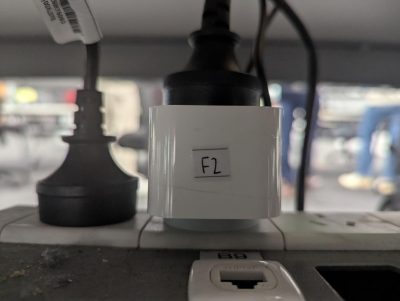
We landed on something simpler: monitor power draw. We purchased 30 Zigbee smart plugs, one per desk. Zigbee runs on a separate frequency to Wi-Fi, forming a reliable mesh network with minimal power consumption. We paired the plugs with our IoT management software and developed logic to classify each desk based on what the monitor or laptop was drawing:

  • In Use: If a monitor or laptop is drawing >= 5 watts.
  • Available: If a monitor or laptop is drawing < 5 watts.
  • Idle/Away: If a monitor or laptop is drawing < 5 watts but had been active earlier.
Figure 1 A Zigbee smart plug monitoring power under desk F2
Figure 1: A Zigbee smart plug monitoring power under desk F2
No cameras. No booking system. No apps. Just a plug under each desk and a threshold. And because the unit cost is tiny, it’s easy to retrofit into any workspace.

Meeting rooms: much simpler

Desks were only part of the picture. For meeting rooms, we took a different approach — pulling the room booking calendar via a simple automation flow. That gave us real-time visibility into which rooms were free, booked, or starting a meeting soon. We’ve also added Zigbee-powered human presence sensors to catch rooms being used outside of bookings — the phantom meeting problem anyone with a shared office will recognise.

Making it visual: a 3D office model

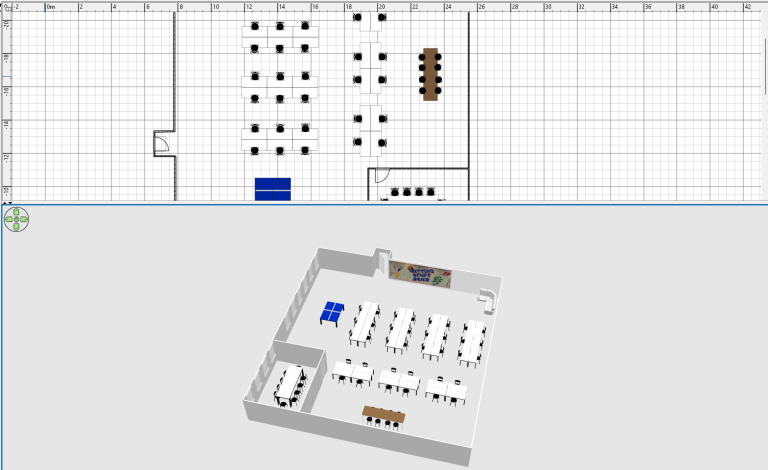
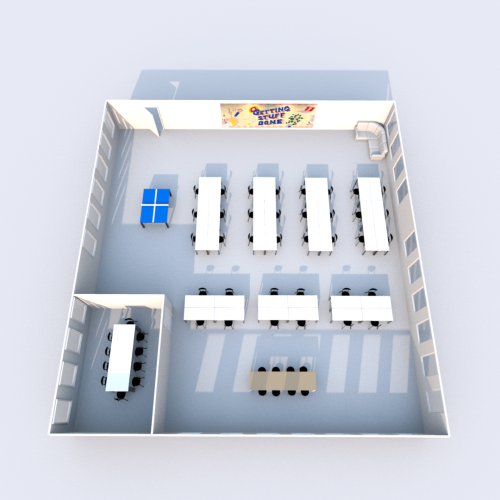
Once the data was flowing, the next challenge was making it readable at a glance. We built a detailed 3D model of our Sydney office — desks, chairs, the ping pong table, even the ‘Getting stuff done!’ mural — and overlaid live availability data on top of it.

Figure 2: Building the 3D model of the office.
Figure 3 A rendered 3D floor plan of our Sydney office.
Figure 3: A rendered 3D floor plan of our Sydney office.
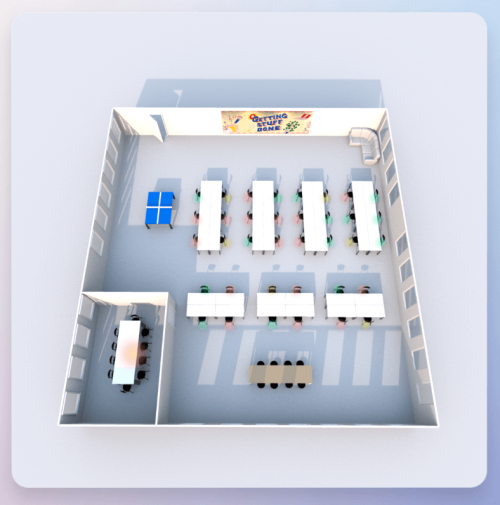
For desks and chairs:
  • Red chairs: in use.
  • Yellow chairs: idle/away (someone has used the desk, but maybe they’ve gone to lunch).
  • Green chairs: available.
For meeting rooms:
  • Red: booked now.
  • Yellow: starting in 15 minutes.
  • Green: available.
Figure 4 The final floor plan with the desk and meeting room usage overlay.
Figure 4: The final floor plan with the desk and meeting room usage overlay.

The result is something anyone on the team can check in seconds — no training required.

Meet Spot! 🐶

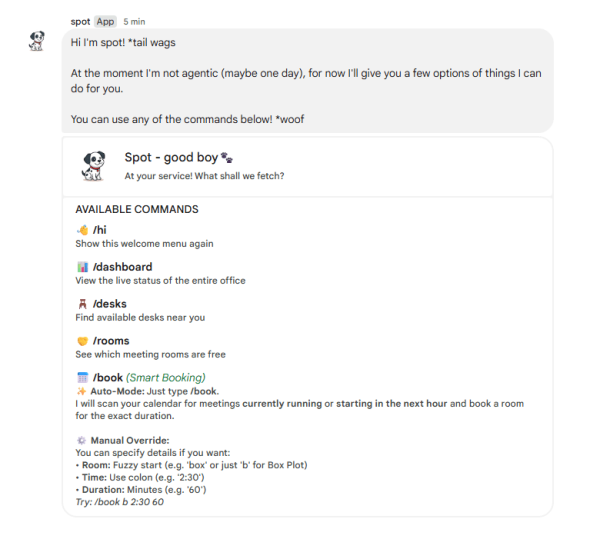
We needed a way to surface the data inside the tools the team already uses, so we built a chat bot and gave it a name: Spot.
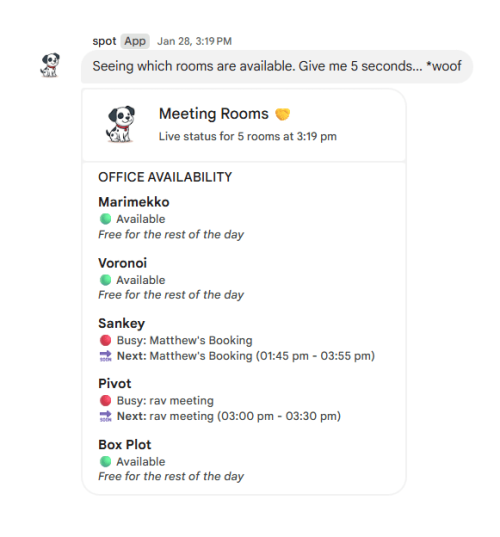
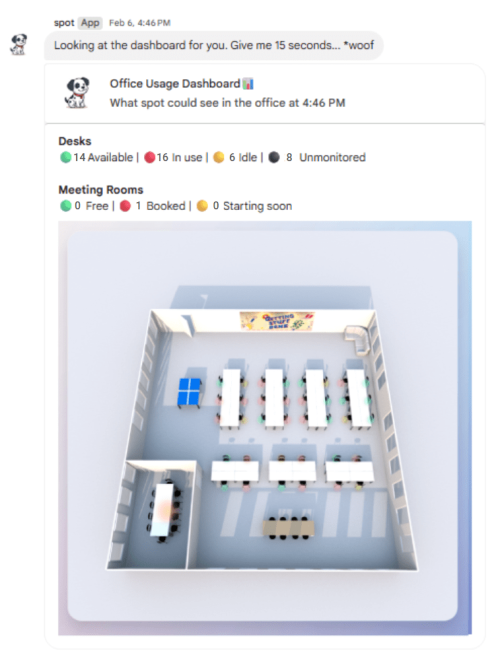
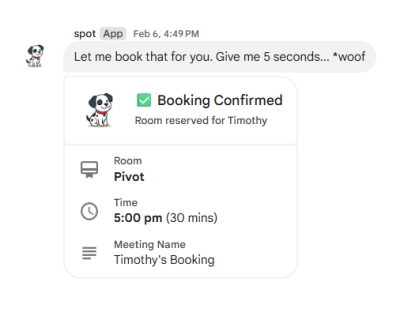
Spot lives in our chat app and responds to commands — which rooms are free, who’s in the office, take a screenshot of the dashboard and show it to me, book me a room.
One deliberate decision worth calling out: Spot is not AI-powered. We kept him deterministic on purpose. The responses are near-instant, the running cost is negligible, and behaviour is predictable. We’re monitoring whether the team wants agentic functionality down the track, but for now, simple and reliable beats clever and unpredictable.

Figure 5 Spot telling a user all the ways that he can help.
Figure 5: Spot telling a user all the ways that he can help.
Figure 6 Spot telling a user which rooms are available.
Figure 6: Spot telling a user which rooms are available.
Figure 7 Spot taking a screenshot of a live a dashboard and showing it to the user.
Figure 7: Spot taking a screenshot of a live a dashboard and showing it to the user.
Figure 8 Spot automatically booking a meeting for a user in an available meeting room.
Figure 8: Spot automatically booking a meeting for a user in an available meeting room.

What we proved

The best internal tools are the ones that slot into existing behaviour rather than demanding new ones. Spot works because it doesn’t require anyone to change how they work — no new app, no swipe card, no booking ritual. The data just appears where people already are.
We also proved that consumer hardware, open-source software, and a bit of engineering time can replace a category of SaaS tooling entirely. The ongoing cost is close to zero.

What’s next

We’re continuing to build. On the roadmap: expanded presence sensing in meeting rooms, smarter booking logic, and — if the team asks for it — agentic functionality. We’d also like to keep evolving the 3D model, including a few office easter eggs we won’t spoil here. 😉

This blog was written by Tim Parker, Senior Data Analyst at EdgeRed.

About EdgeRed

EdgeRed is an Australian AI and data consultancy, part of The Omnia Collective group, with teams in Sydney and Melbourne. We build things that work in production — agentic AI, machine learning, data engineering, and Microsoft Fabric implementation. 250+ projects. 100+ clients. 100% Australian on-shore team.

Subscribe to our newsletter for practical data and AI insights, straight to your inbox.